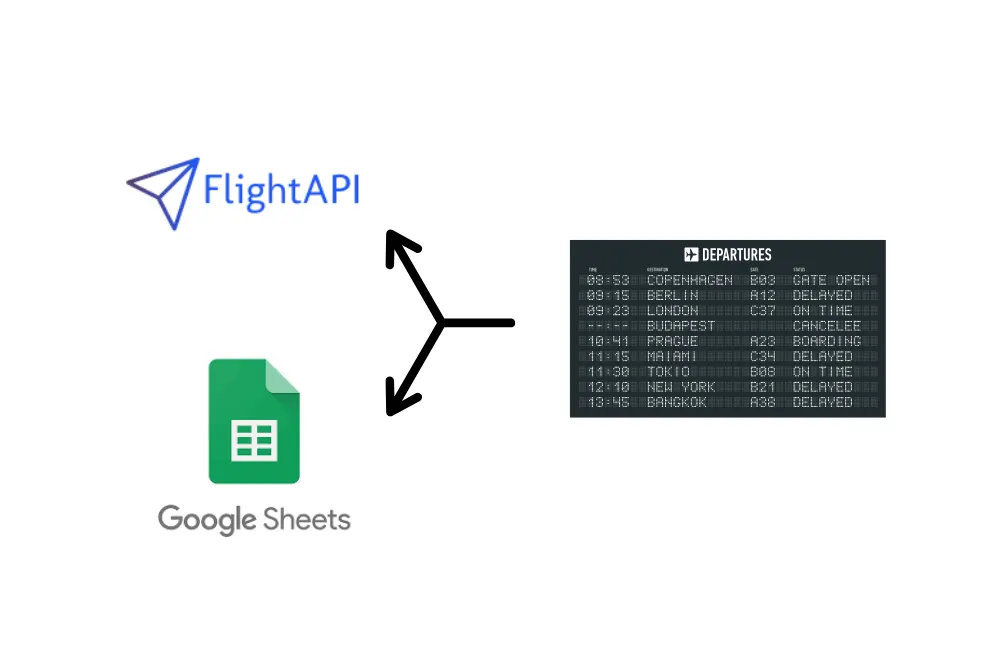
FlightAPI

How to Check Airport Schedule using Google Sheets and Airport Schedule API?

By Neha Jangid 4 min read

how to extract data with airport schedule api

Finding flight schedules for an airport shouldn’t feel like searching for a needle in a haystack. But hopping between airline websites, refreshing pages, and manually compiling data? That’s a time-wasting nightmare.

What if you could get all that information directly in a Google Sheet—automatically? No coding, no complex setups—just a simple process that fetches real-time airline schedules in seconds.

In this guide, you’ll learn how to use Google Sheets and an API to extract airport schedules with ease. Follow the steps, set up your tool, and by the end, you’ll also get a blueprint sheet so you can plug in your details and get started instantly.

Let’s get to it. 

What You’ll Need:

  • FlightAPI’s Airport Schedule API 
  • Google Sheet

Step 1: Get Your API Key

  1. Sign up on FlightAPI.
  2. Verify your email to activate your account.
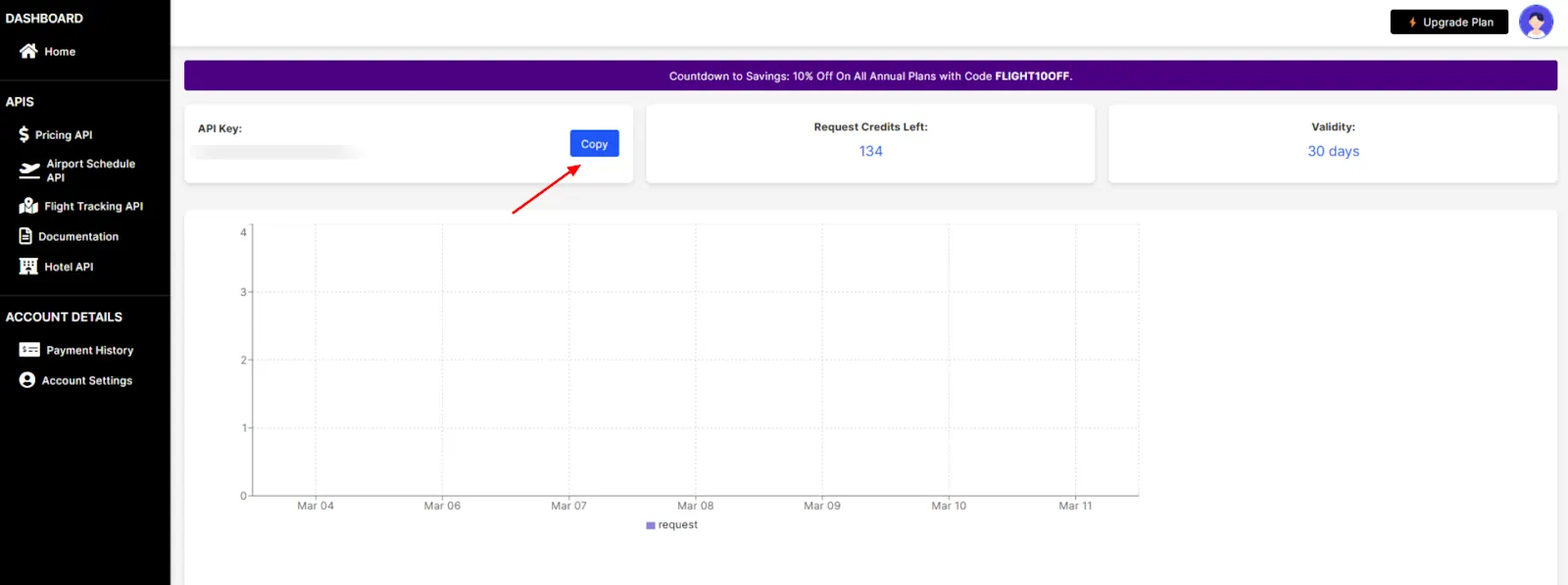
  3. Go to the dashboard and copy your API key from there.
Step 2: Create Google Sheet

  1. Open Google Sheets and create a new spreadsheet.
  2. Create a sheet named “input”:
    • In the first row, write “IATA” and make it bold.
    • Below this, enter the IATA codes of the airports you want to schedule data for.
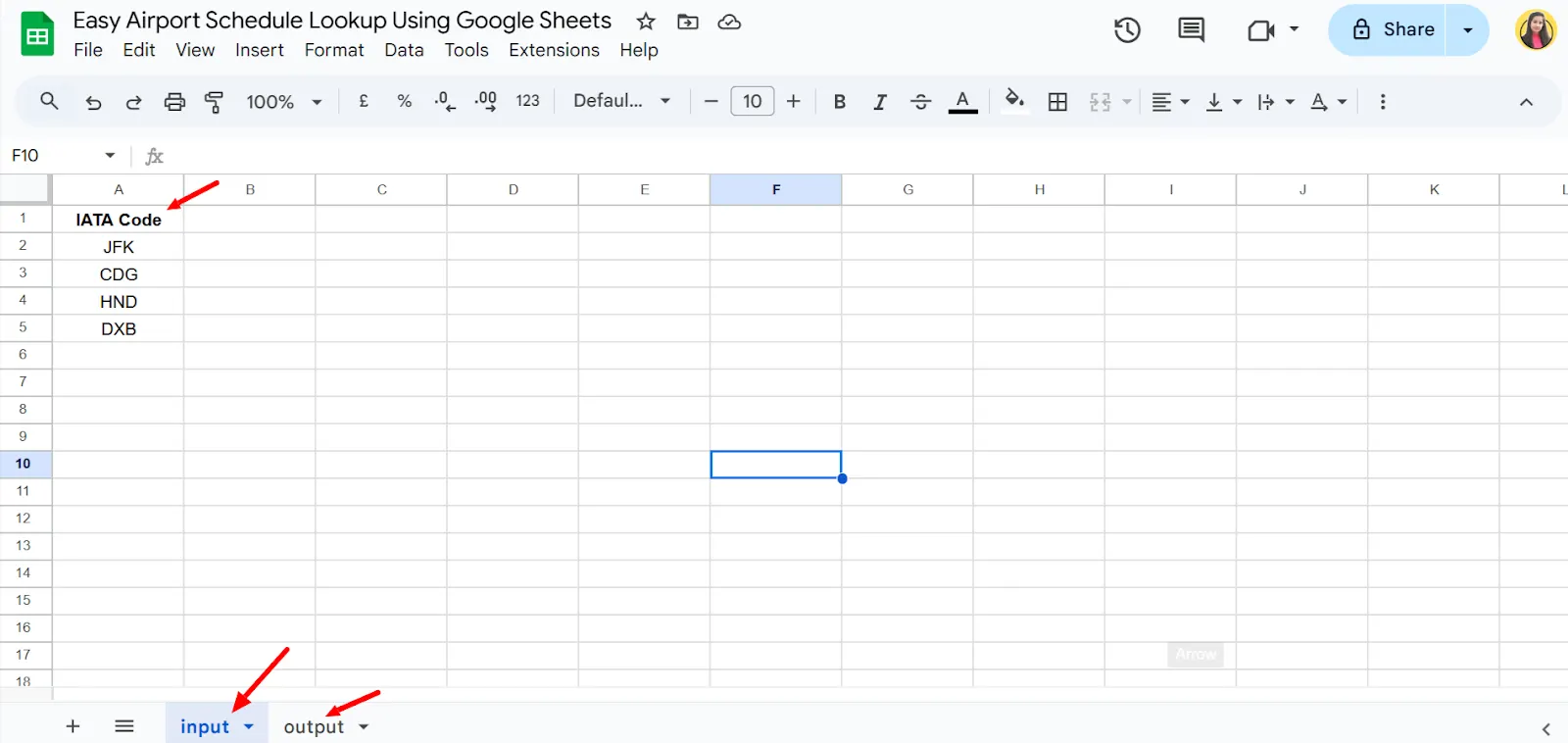
  1. Create another sheet named “output” and leave it blank for now.

Step 3: Add the Apps Script to Google Sheets

Now that you have the required details, it’s time to insert the script into your Google Sheet. Follow these steps:

  1. Open your Google Sheet.
  2. Click on Extensions in the top menu.
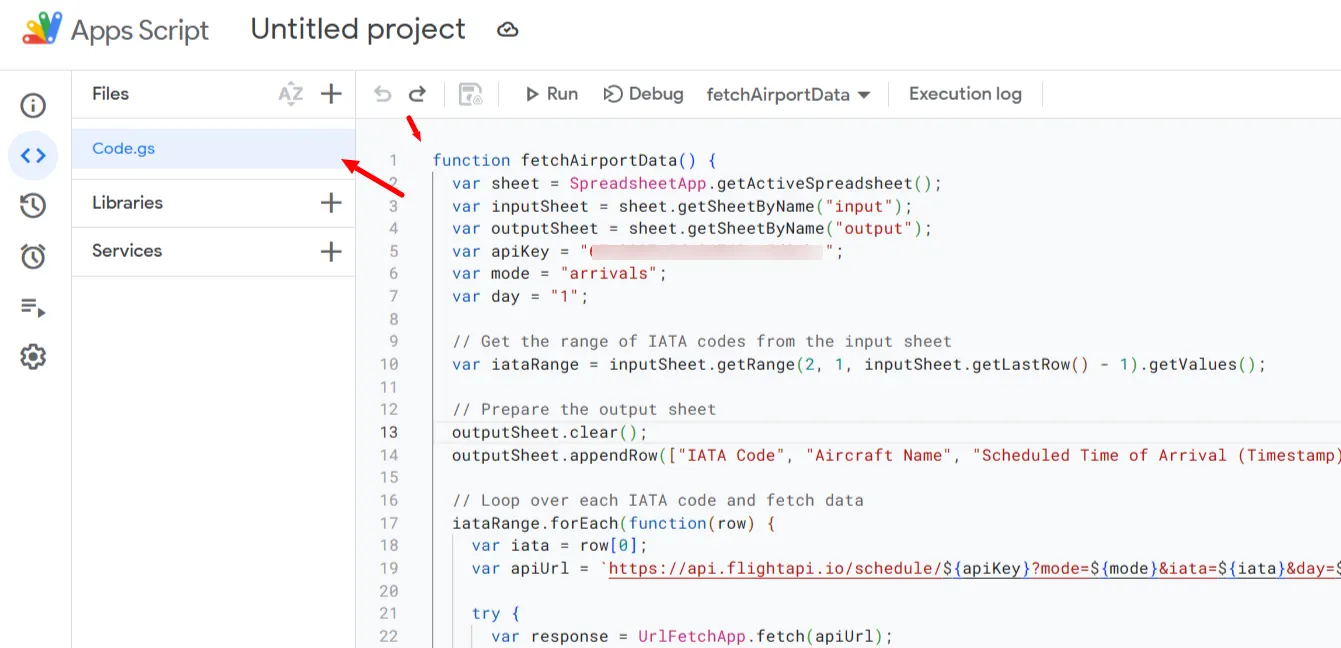
  3. Select Apps Script from the dropdown. This will open a new tab with the Google Apps Script editor.
  4. In the left sidebar, click on Code.gs.
  5. Delete any existing code in the editor.
  6. Copy the below script and paste it into the editor.
function fetchAirportData() {
  var sheet = SpreadsheetApp.getActiveSpreadsheet();
  var inputSheet = sheet.getSheetByName("input");
  var outputSheet = sheet.getSheetByName("output");
  var apiKey = "MY API_KEY";
  var mode = "arrivals";
  var day = "1";
  // Get the range of IATA codes from the input sheet
  var iataRange = inputSheet.getRange(2, 1, inputSheet.getLastRow() - 1).getValues();
  // Prepare the output sheet
  outputSheet.clear();
  outputSheet.appendRow(["IATA Code", "Aircraft Name", "Scheduled Time of Arrival (Timestamp)", "Airline Name"]);  // Added IATA Code to the header
  // Loop over each IATA code and fetch data
  iataRange.forEach(function(row) {
    var iata = row[0];
    var apiUrl = `https://api.flightapi.io/schedule/${apiKey}?mode=${mode}&iata=${iata}&day=${day}`;
    try {
      var response = UrlFetchApp.fetch(apiUrl);
      var jsonData = JSON.parse(response.getContentText());
      jsonData.airport.pluginData.schedule.arrivals.data.forEach(function(flight) {
        var aircraftName = flight.flight.aircraft.model.text; // Ensure this path is correct
        var airlineName = flight.flight.airline.name; // Fetching airline name
        var scheduledArrivalTimestamp = flight.flight.time.scheduled.arrival; // Fetching the numeric timestamp directly
        outputSheet.appendRow([iata, aircraftName, scheduledArrivalTimestamp, airlineName]);
      });
    } catch (e) {
      console.error("Failed to fetch or parse data for IATA: " + iata + " with error: " + e.toString());
      // Optionally log to the sheet if error handling is needed within the sheet
      outputSheet.appendRow([iata, "Error fetching data for IATA: " + iata, "", ""]);
    }
  });
}
Step 3: Edit the Apps Script Code

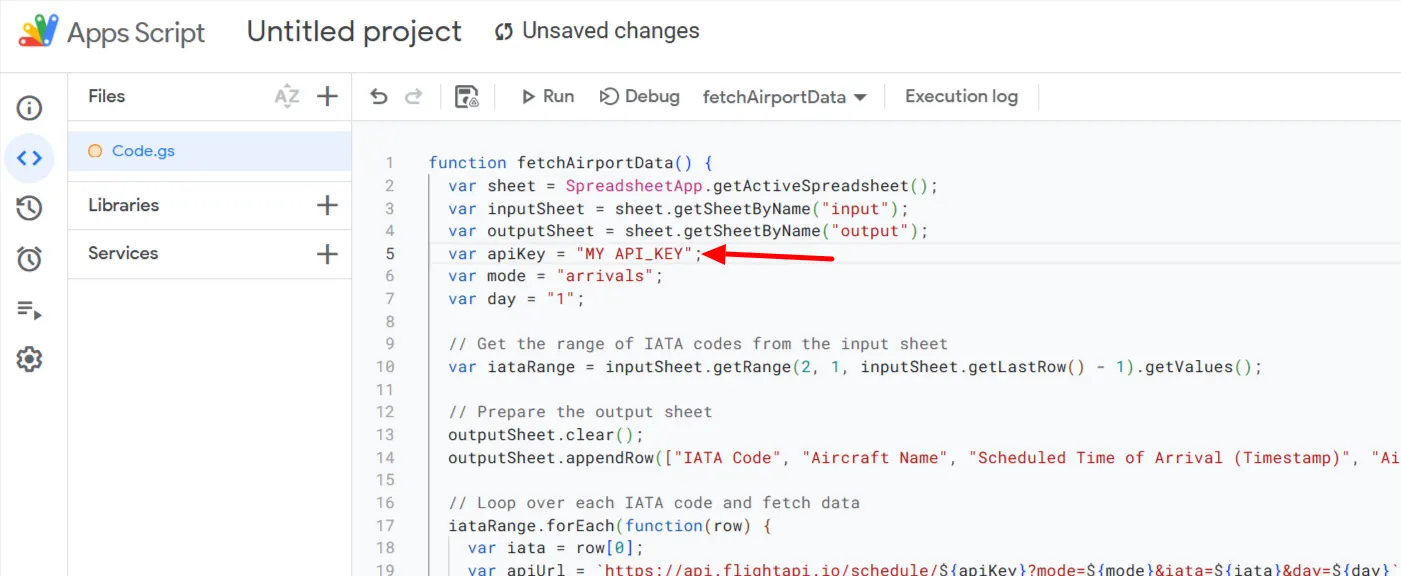
1. Your API Key

  • In the script, find the line where the API key is defined.
  • Replace “My API_KEY” with your actual API key from FlightAPI.
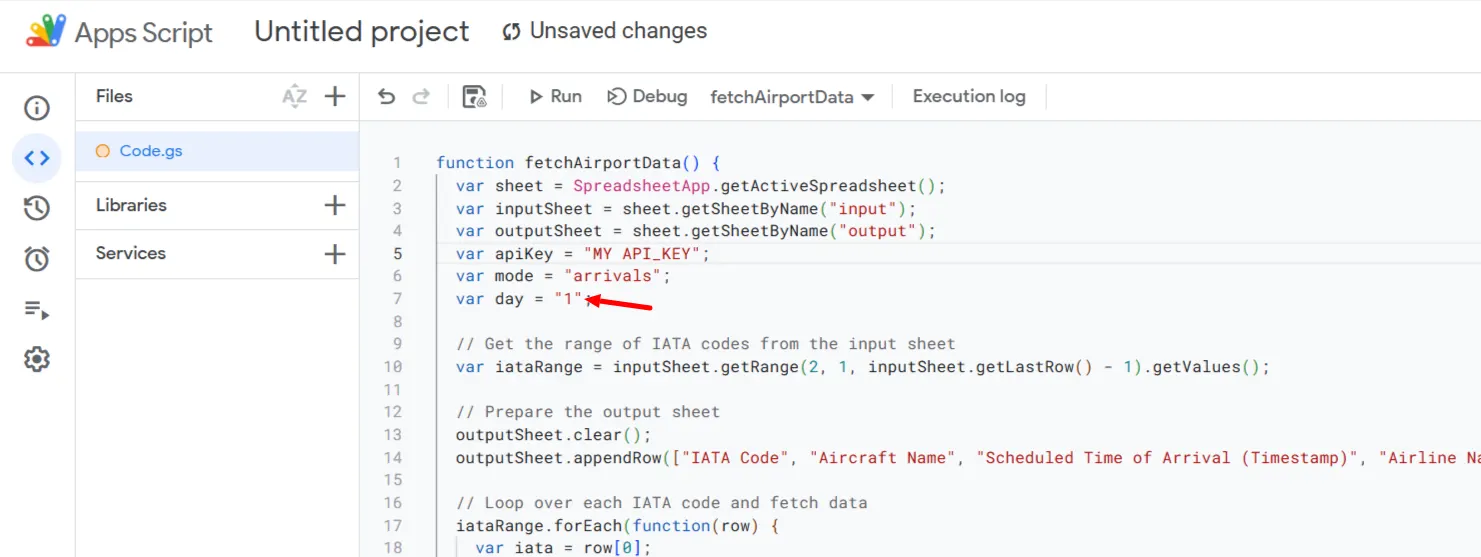
2. Select the Date for Schedule Data

The API allows you to fetch schedules for yesterday, today, or tomorrow, using numerical values:

  • -1 → Yesterday
  • -2 → Day before yesterday
  • 1 → Today
  • 2 → Tomorrow

Add the numbers accordingly in the script here.
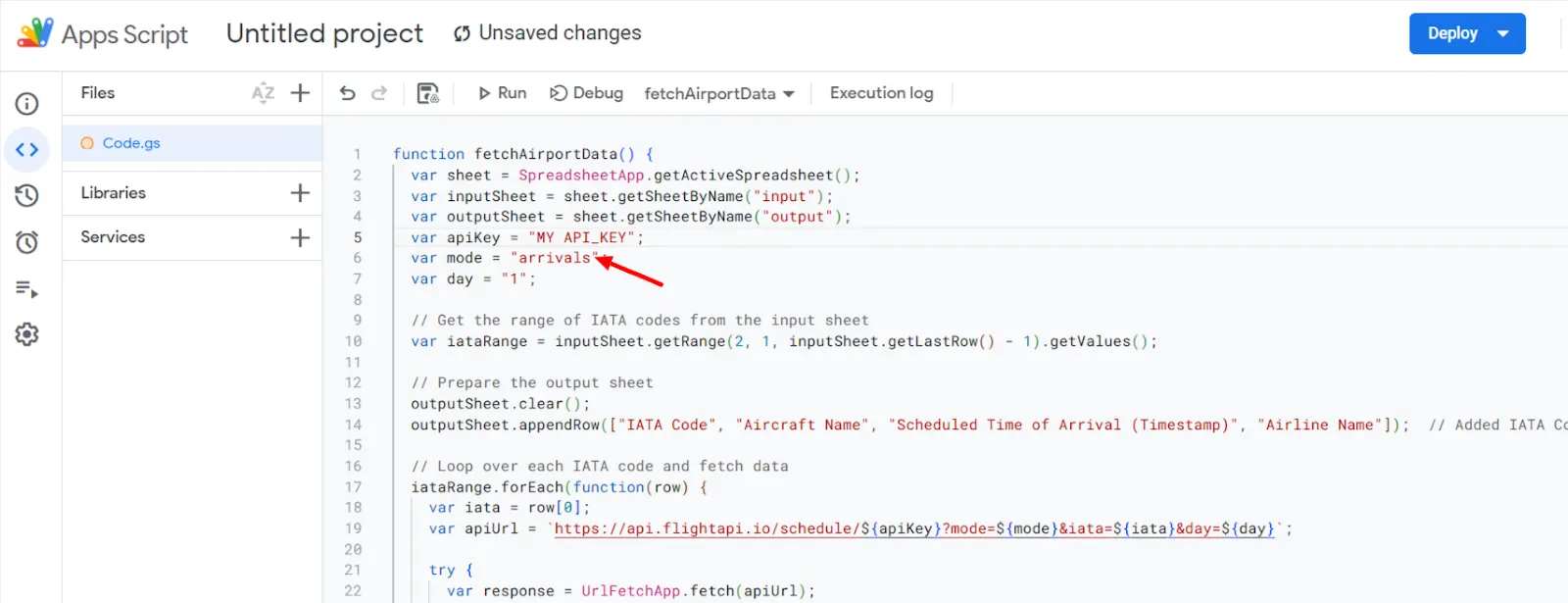
3. Choose Arrival or Departure Data

The API allows you to pull data for either:

“arrivals” → To get incoming flights

“departures” → To get outgoing flights

In the script, look for the mode and change it based on what you need.
If you need additional options or details about the API, check out the Airport Schedule API documentation.

Step 5: Save, Run the Script, and Check the Output

  1. After making the necessary edits to the API key, date, and mode, click on the disk icon (or press Ctrl + S) to save the script.
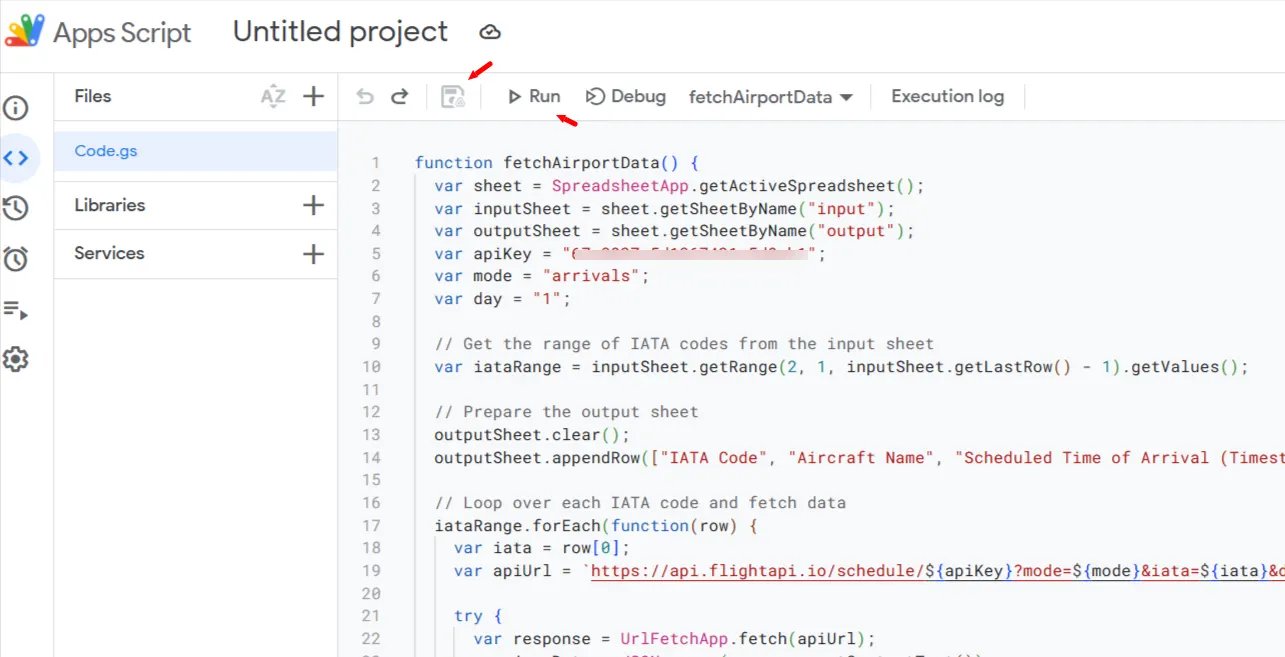
  1. At the top of the Apps Script editor, click on the Run button.
  2. The script will ask for permission the first time you run it. Click Review Permissions and allow access using your Google account.
  3. Once authorized, the script will execute and start pulling airport schedule data into your Google Sheet.
  4. Check the “output” sheet in your Google Sheet. If everything is set up correctly, you should see the flight data appear within a few seconds.
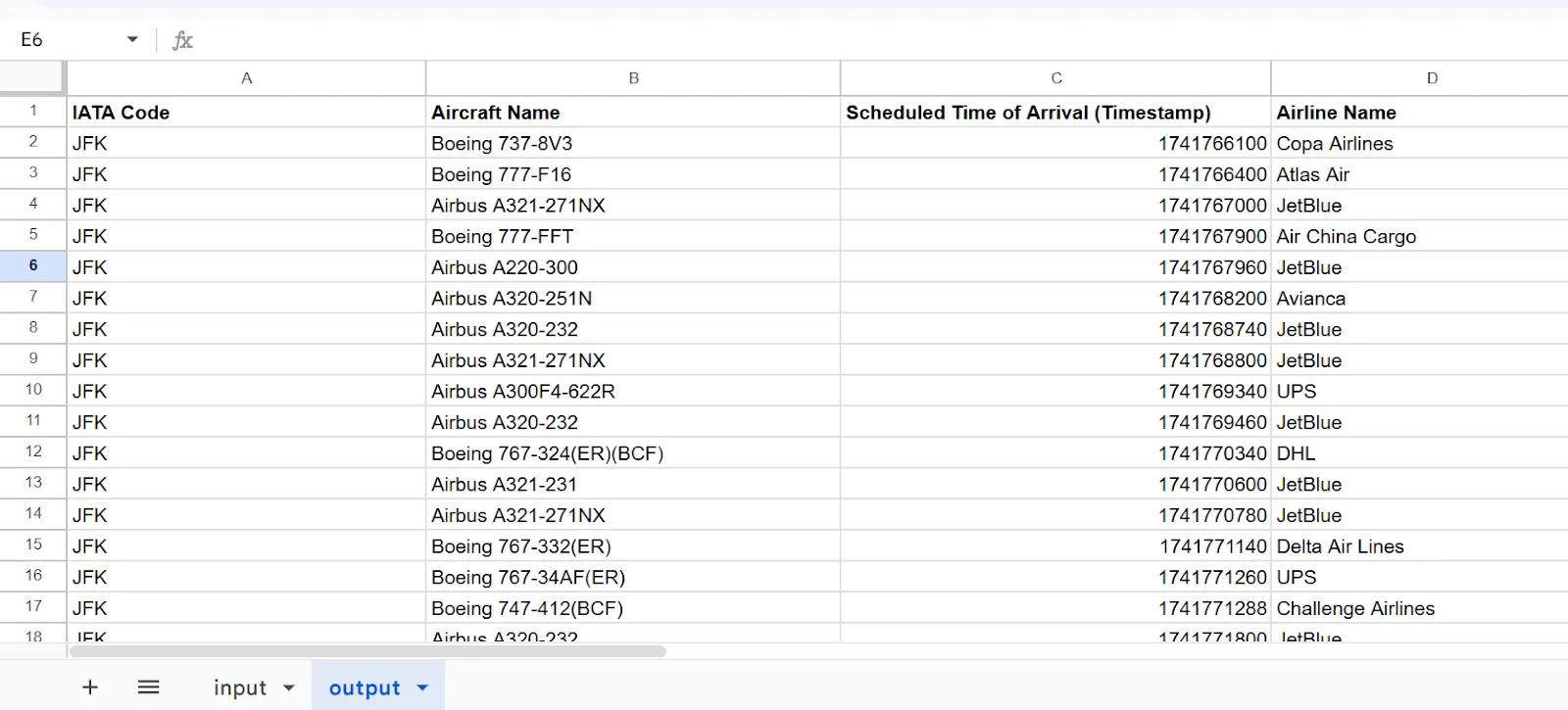
Download the Pre-Built Blueprint

No need to start from scratch—simply download the pre-built blueprint, make the necessary changes, and run the script to start fetching flight schedule data instantly. 

Click here to download your copy

Wrap Up:

With this Google Sheet blueprint, you can effortlessly track airport schedules. Flightapi.io not only offers Airport Schedule API but also offers Flight Price API and Flight Status API for catering to various data needs.

If you’re looking to delve deeper into flight data extraction, whether through Python or no-code solutions, explore these additional resources to enhance your capabilities and streamline your data management processes.

Neha Jangid

Neha Jangid

Neha Jangid is an SEO and content specialist at FlightAPI, crafting tutorials and content that simplify flight data for users. She blends SEO strategy with clear communication to boost visibility and user engagement.

Read more articles to stay informed and explore related topics.

Flight API Statistics and Trends 2026

Neha Jangid

The airline industry is constantly evolving, but the data associated with it doesn’t always keep pace. Delay figures, API market sizes, passenger numbers, and AI adoption rates across airlines are scattered across paywalled reports and outdated press releases. Getting a clear picture of where flight APIs actually stand in 2026 takes time, even with AI search, because the results aren’t always accurate or complete. That’s why I researched, fact-checked, and put everything together in one place. This piece covers everything from the flight API market size and growth to what’s shaping the industry through the rest of 2026. Let’s go. The Flight Data API Market: Size and Growth The flight data API market has moved from a niche developer tool to a core layer in aviation infrastructure. But measuring its exact size isn’t straightforward. Different research firms define the market differently. Some focus only on flight status and tracking APIs. Others include broader aviation data services like pricing, analytics, and operational intelligence. That’s why the numbers don’t always line up. What does line up is the trajectory. Growth is consistent across every dataset. According to Verified Market Reports, the flight data API market was valued at USD 1.52 billion in 2024 and is projected to reach USD 4.67 billion by 2033, growing at a CAGR of 13.5% between 2026 and 2033. Other estimates sit in a similar range but differ slightly in scope. Business Research Insights Flight Data API Market places the market at USD 1.65 billion in 2026, reaching USD 3.29 billion by 2035, with a CAGR of 8.2%. While market definitions vary across reports, the overall growth trajectory remains consistent. What’s Driving Its Growth The shift toward APIs is already evident in airline operations, with adoption moving beyond early experimentation into core usage. Source: Business Research Insights aviation API report These figures reflect a broader structural shift in aviation. Airlines now operate in real time, where delays, pricing, routing, and passenger updates depend on continuous data exchange. APIs enable this without requiring complete system rebuilds. At the same time, cloud adoption is accelerating deployment and scalability, making it easier to integrate new data sources. The growing travel tech ecosystem, including aggregators and third-party platforms, is further increasing demand for structured flight data. In addition, data is becoming a strategic asset. Airlines are using it not only for operations but also to optimize pricing, route efficiency, and customer experience, reinforcing the role of APIs as a foundational layer in modern aviation systems. The Biggest Barrier to Adoption Despite strong market growth, adoption remains uneven across the aviation industry, with integration challenges acting as the primary constraint rather than a lack of demand. Key limitations across airlines: These constraints highlight a structural divide in the market. Larger airlines, supported by stronger infrastructure and budgets, are scaling API usage across operations. In contrast, smaller carriers and legacy systems face slower adoption cycles due to compatibility and cost limitations, rather than a lack of strategic intent. Where the Market Stands The flight data API market is transitioning into a foundational layer within aviation systems, with adoption already widespread among major airlines. Current market position: While market estimates vary depending on how the segment is defined, the overall direction remains consistent. APIs are increasingly becoming the standard method for data exchange across aviation systems, with their role expected to strengthen further as the industry continues to prioritize real-time operations and data-driven decision-making. Flight Data Providers for Core Data Needs As aviation systems become more data-driven, most applications depend on a consistent set of core data points. Across booking platforms, tracking tools, and internal systems, the primary needs remain the same – accurate pricing, real-time flight status, and reliable schedule data. To meet these needs, there are multiple flight data providers available, each offers different datasets and levels of coverage. However, for teams looking to access pricing, status, and schedule data through a single integration, platforms like FlightAPI bring these core data points together in one place. Explore the dedicated APIs and the data points👇 Flight Price API delivers real-time fare data across routes, supporting one-way, round-trip, and multi-city searches. It aggregates pricing from multiple airlines and vendors, returning structured details such as airline, route segments, duration, and fare breakdowns that make it suitable for booking engines and comparison platforms. Flight Status API provides live operational updates, including departure and arrival times, delays, cancellations, and flight progress. It also includes details like terminal and gate information where available, helping systems stay aligned with actual flight movements. Airport Schedule API offers structured data on arrivals, departures, routes, and timings across airports. This acts as a base layer for search, route mapping, and planning systems. Sign up to test these APIs and get 20 free credits. If you’re looking for additional travel data, I’ve put together a detailed roundup of tested Travel API providers for flights, hotels, and more. Aviation Demand Metrics For Passenger Growth and Capacity Trends Flight API usage is directly tied to how active and complex the aviation industry is at any given time. More passengers, higher load factors, and tighter schedules don’t just increase traffic; they increase the need for real-time coordination across systems. The current data shows that aviation demand is not just recovering, it is stabilizing at high levels. Global Passenger Demand The combination of rising demand + high load factors means airlines are operating closer to capacity limits. There’s less room for inefficiencies, which increases reliance on real-time systems to manage disruptions, pricing, and scheduling. Early 2026 Trends Source: IATA – Air Passenger Market Analysis (March 2026)Source: SITA Air Transport IT Insights Growth is continuing, but at a more controlled pace compared to the recovery years. That shift is important. It signals a move from rapid rebound to operational stability, where efficiency and optimization become more important than raw expansion. Again, both depend on structured and real-time data access. Peak Demand and Capacity Source: OAG – Airline Capacity Statistics The gap between peak and low-capacity days highlights how

Read More

AviationStack vs FlightAPI: Which Flight Status API Should You Choose?

Neha Jangid

Both AviationStack and FlightAPI are popular choices for developers who need flight status and tracking data. If you are looking for the same, this guide compares both APIs so you can understand what they offer before integrating one into your project. In this blog post, I have broken down the important details of each API. We will look at the type of data points they return, how their endpoints work, and what features they provide that may matter during development. Things like flight status coverage, request limits, and ease of integration can affect how smoothly your application works once it goes live. Let’s get started with FlightAPI. FlightAPI FlightAPI provides APIs that allow developers to retrieve flight status and tracking information.  For this use case, it mainly offers two endpoints. One allows you to track a specific flight using the airline code and flight number. The other lets you check flights operating between two airports on a specific date. Both APIs return structured JSON responses, so the data can easily be parsed and displayed inside travel platforms, airport dashboards, or tracking tools. Data Returned Since FlightAPI provides two APIs for flight status and tracking, the type of data returned depends on the endpoint being used. 1. Flight Tracking API This flight tracking API tracks a specific flight using its airline code and flight number. The response contains detailed departure and arrival information for that flight. Common fields returned include: The response separates departure and arrival objects, which makes it easier to extract and display the data in flight tracking interfaces. To know more about the endpoint, parameters, and the response, check out the documentation. 2. Track Flights Between Airports API The second API allows you to track flights operating between two airports on a specific date. Instead of returning a single flight, this endpoint returns a list of flights scheduled on that route. Typical fields returned include: This endpoint is useful when you want to display all flights operating between two airports rather than tracking just one flight. Explore the documentation page to know more. Speed and Integration Both APIs follow a simple request structure. Developers only need to send a GET request with the required parameters, and the API returns the flight data in JSON format with lightning speed. Plus, the responses are structured and lightweight; they can be easily parsed in backend environments such as Node.js, Python, or other server-side languages. Pricing Best for FlightAPI is a good option for projects that need simple flight status and tracking data. It can be used for ⬇️ If you prefer no-code tools, you can still integrate FlightAPI and export flight tracking data without writing any code. Below are a few step-by-step tutorials that show how to build simple flight tracking workflows using popular tools ⬇️ AviationStack AviationStack provides a REST API that allows developers to retrieve real-time flight status and aviation data. For flight tracking and status use cases, the API mainly relies on the Flights API and the Airport Timetable API. Unlike some APIs that provide a dedicated flight tracking endpoint, AviationStack uses multiple endpoints depending on the type of query. For example, you can retrieve the status of a specific flight using filters in the Flights API, while airport arrival and departure boards are retrieved using the Timetable API. Endpoints return structured JSON responses, which makes the data easy to parse and integrate into travel platforms, airport dashboards, or flight monitoring tools. Data Returned Since AviationStack provides multiple endpoints across its aviation dataset, the response depends on which endpoint you use for flight status and tracking. Below are the main endpoints developers use when retrieving flight status data. 1. Flights API Endpoint: https://api.aviationstack.com/v1/flights This endpoint returns real-time flight status information and can also return historical flight data depending on the plan. Developers can filter results using parameters such as flight number, airline, departure airport, arrival airport, or flight status, which makes it possible to track specific flights. Common fields returned include: The response separates airline, flight, departure, and arrival objects, which makes it easier to extract flight information inside applications. 2. Flight Schedules API Endpoint: https://api.aviationstack.com/v1/flight_schedules This endpoint returns scheduled flights for airports or routes. Instead of returning a single flight, this endpoint returns a list of flights scheduled to arrive or depart from an airport, which makes it useful for building airport arrival or departure boards. Typical fields returned include: This endpoint is commonly used for airport schedule dashboards or arrival/departure boards. 3. Future Flight Schedules API Endpoint: https://api.aviationstack.com/v1/flightsFuture This endpoint allows developers to retrieve future scheduled flights. It is mainly used by applications that need to analyze or track upcoming flights for a specific airport or route. Typical fields returned include: This endpoint helps developers build tools that require future flight planning or schedule monitoring. Speed and Integration These APIs are in standard REST request structure, so developers can retrieve flight data by sending a simple HTTP GET request. Responses are returned in JSON format, which makes them easy to parse in backend environments such as Node.js, Python, PHP, or other server-side languages. Real-time flight status updates are typically delayed by around 30–60 seconds, which is considered average in the industry. Pricing Best for Projects that need detailed flight status data along with airport-level schedules. Typical use cases include: Final Verdict Both AviationStack and FlightAPI are solid APIs for retrieving flight status and tracking data. The right choice depends on how much data you need and how complex your integration is. You can explore more options in our blog on the best flight status APIs. If your goal is to track flights quickly and integrate the data with minimal setup, FlightAPI is usually the better option. It provides focused endpoints for tracking a flight by number or retrieving flights between airports. The responses are lightweight, integration is straightforward, and the pricing is more economical for higher request volumes. For most developer use cases like travel apps, tracking dashboards, or logistics tools, FlightAPI already returns the

Read More

Need Help

Choosing a Plan? Got doubts?

Not sure which plan fits your needs? Our team is here to help—just reach out!

Talk for sales